As you know, Instagram is an excellent platform for businesses, influencers, and individuals to connect with their audience and promote their products, services, or personal brand.
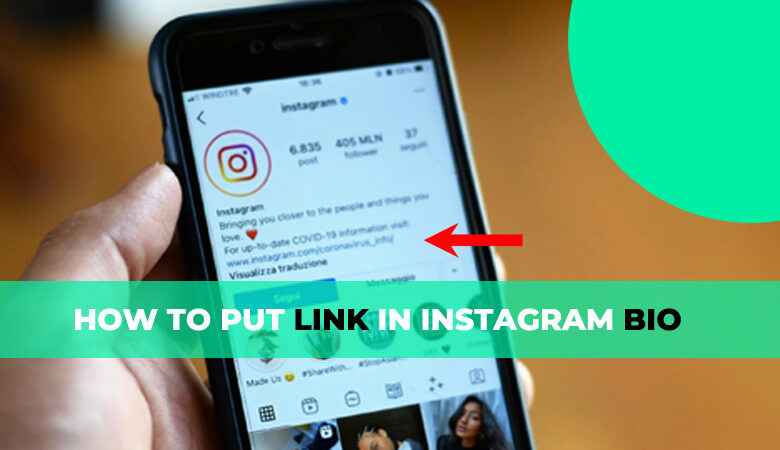
One of the essential features of Instagram is the ability to add links to your bio. Adding links to your Instagram bio can help drive traffic to your website, blog, or other social media accounts.
This article will discuss how to put a link in your Instagram bio and provide tips to make the most out of this feature.
Whether new to Instagram or looking to improve your social media strategy, this guide will help you optimize your bio and increase your reach on the platform.
Why adding a link to your Instagram bio is essential?
Adding a link to your Instagram bio is crucial for several reasons:
- Firstly, it allows your followers and potential customers to quickly access your website, blog, or other social media accounts. It is an effective way to drive traffic to your website or promote your other social media channels.
- Secondly, adding a link to your Instagram bio can increase your reach and help you gain new followers. You can use the link to promote your latest products, services, or blog posts, which can attract new visitors to your website.
- Thirdly, Instagram’s algorithm rewards profiles that use all its features, including adding a link to the bio. This can improve your account’s visibility and increase engagement.
- Finally, it is a great way to track the effectiveness of your social media marketing efforts.
You can measure the clicks using a tracking link and see which posts or campaigns drive the most traffic to your website.
Adding a link to your Instagram bio is a simple but effective way to enhance your social media presence and achieve your marketing goals.
How to edit your Instagram profile to add a link
Adding a link to your Instagram profile is a simple process that can be done in just a few steps.
Here is how to do it:
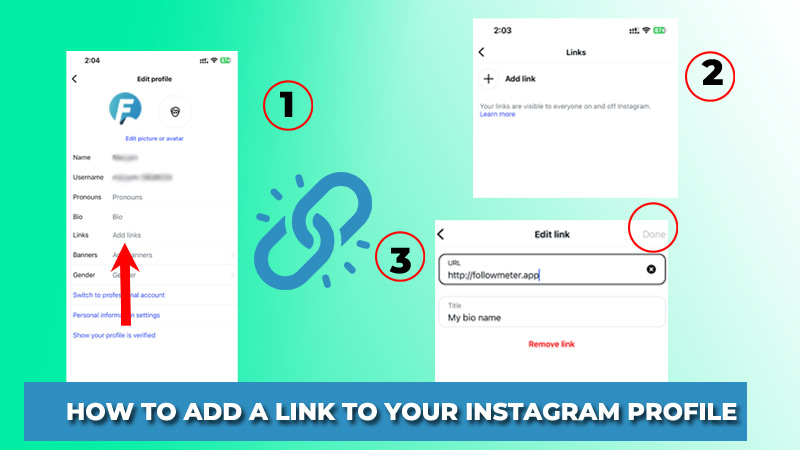
- Open the Instagram app and navigate to your profile by tapping your profile picture in the bottom right corner of the screen.
- Tap on the “Edit Profile” button located underneath your bio.
- In the “Website” field, enter the link you want to add. You can use a shortened link if you prefer.
- Tap on the “Done” button in the top right corner of the screen.
- Your link is now added to your Instagram bio. By clicking the “See Profile” button, you may see it.
- If you want to change the link later, repeat the same steps and enter the new link in the “Website” field.
It is important to note that Instagram only allows one clickable link in your bio. To promote multiple links, you can use link tree tools like Linktree or Campsite to create a landing page with multiple clickable links.
How to include more links in your Instagram Bio?
Most users require more than one link to their Instagram profile. Some of them aim to lead the audience to both their online store and their social accounts.
Others must additionally include messaging app URLs, such as their Snapchat profile URL or their Twitter profile URL.
You can increase your Instagram bio by using this advanced link in the bio. It enables you to include more than one clickable link, additional text, and media items.
You may insert as many as you wish. Besides links, you may include various blocks such as a photo, video, location, form, payment, etc.
Who stands to gain from including links in their Instagram bio?
- Internet retailers. Make it possible for your Instagram followers to shop. Different blocks and design templates make launching an online sale possible in minutes.
- Bloggers, singers, and social media influencers. Increase your popularity by informing others about yourself on the website. You may use the link in your Instagram bio to direct users from Instagram to a YouTube video, Spotify music, ticket purchase, registration for events, and so on.
- Inform them about your business and its items. Let your clients pick the best way to reach you and your location and business hours. People might also be directed to pay for products and services. You can add all this to your Instagram bio with a single link!
- All of us. Even if you don’t consider yourself a media person, we’re confident you have something to say to the rest of the world. Use the link in your Instagram bio to add information about yourself, your hobbies, and your accomplishments.
Tips for optimizing your link and bio
Optimizing your link and bio on Instagram is essential to ensure that you make the most out of this feature.
Below are +6 tips to help you optimize your link and bio:
- Make sure your link is relevant and valuable to your audience. The link should lead to your website, blog, or social media account relevant to your niche or business.
- Use a call-to-action in your bio to encourage your followers to click the link. For example, you could use phrases like “Shop now,” “Learn more,” or “Get started.”
- Use emojis in your bio to make it visually appealing and easier to read. Emojis can also help you convey your brand’s personality and tone.
- Use keywords in your bio that describe your brand or niche. This can help your profile appear in search results when people search for relevant terms.
- Update your bio regularly to reflect any changes in your brand or business. This could include updating your call-to-action or highlighting new products or services.
- Use a branded link shortener to make your link more memorable and promote your brand.
Tracking & measuring the success of your link in your bio
Tracking and measuring the success of your link in your Instagram bio is crucial to understand how effective your marketing efforts are in driving traffic to your website.
1. Use a URL shortener
A URL shortener like Bitly or Google URL shortener can help you track clicks on your link. You can see how many clicks your link has received and where those clicks came from.
2. Use Google Analytics
By adding UTM parameters to your link, you can track clicks and measure the success of your Instagram marketing efforts in Google Analytics. You can see how many visitors came from Instagram and which pages they visited on your website.
3. Monitor engagement
In addition to tracking clicks, monitoring engagement with your link is essential. This can include tracking conversions, sign-ups, and purchases from Instagram traffic.
4. Experiment with different strategies
Try different strategies to see which are most effective in driving traffic to your website. This could include changing your call-to-action, promoting different products or services, or using different types of content.
To conclude
Learning how to put a link to your Instagram bio can be a powerful tool for driving traffic to your website and increasing engagement with your audience.
By following the tips for optimizing your link and Instagram bio and avoiding common mistakes, you can make the most of this feature and achieve your social media marketing goals.
Remember to track and measure the success of your link on your Instagram bio to understand what works best for your audience and to improve your strategy continually.
So, start implementing these tips today and watch your Instagram presence grow!
Let’s realize your ideas about putting a link to your Instagram bio.