Have you ever opened your Instagram profile and wished you could rearrange Instagram posts on the grid without deleting anything?
For years, that wasn’t possible, leaving users stuck with an Instagram layout they no longer loved. Now, Instagram has finally changed the rules.
With its new grid reordering feature, you can refresh your profile while keeping your likes, comments, and upload date exactly as they are. Here’s everything you need to know before you start reorganizing your profile.
What Is Instagram Grid Reordering?
Reorder Instagram grid is a feature designed to give users more control over how their profile content appears. Instead of having every post permanently fixed based on publishing time, this update allows creators and brands to create a more intentional profile structure.
Before this option was introduced, changing the appearance of a profile required extra effort; users often had to archive older content, move Instagram posts, or carefully plan future uploads to maintain a consistent Instagram feed layout.
The new Instagram grid reorder feature solves this problem by making profile organization easier and more flexible. It helps users decide which content should appear first and how visitors experience their page when they open it.
With this feature, users can:
- Arrange important content in a more strategic order.
- Create a smoother visual experience for profile visitors.
- Showcase their strongest posts without removing older content.
- Adjust their page according to campaigns, seasons, or personal goals.
- Create a more professional presentation for their audience.
Unlike pinned posts, which only highlight a limited number of posts at the top of a profile, grid reordering focuses on improving the overall structure of your content.
This makes it a valuable option for creators, photographers, artists, educators, and brands that use Instagram as an Instagram portfolio.
Can You Really Rearrange Instagram Posts?
Yes. Instagram now allows eligible users to change Instagram grid layout without deleting or uploading them again. If your account has access to this option, you can rearrange Instagram posts on the grid quickly and keep your existing engagement.
Changing your grid affects only the way visitors see your profile. It does not rewrite your account history or modify the original performance of your posts.
| Changes | Doesn’t Change |
| Grid appearance | Upload date |
| Visual structure | Likes |
| First impression | Comments |
| Content arrangement | Captions |
| Brand presentation | Engagement history |
Only the visual order of your page changes. Your content keeps its value while your profile becomes easier to customize.
This makes it possible to create a stronger Instagram profile design while protecting previous interactions. Many creators use this option for visual branding, updating seasonal content, or placing their most attractive work in a better position.
For companies, this feature provides more flexibility when managing a business profile because they can improve their presentation without disrupting active campaigns or changing shared links.
Better Instagram feed organization also helps users guide visitors toward important products, announcements, or popular content. Compared with the old chronological system, this gives creators much more freedom to control how people experience their profile.

How to Rearrange Instagram Posts on Your Grid?
Now that Instagram gives users more control over their profiles, changing the order of your content has become much easier. If the feature is available on your account, you can rearrange Instagram grid directly from the Instagram app without using additional tools.
Follow these steps to update your grid:
- Open Instagram and log into your account.
- Go to your profile by tapping your profile picture.
- Choose the post you want to move.
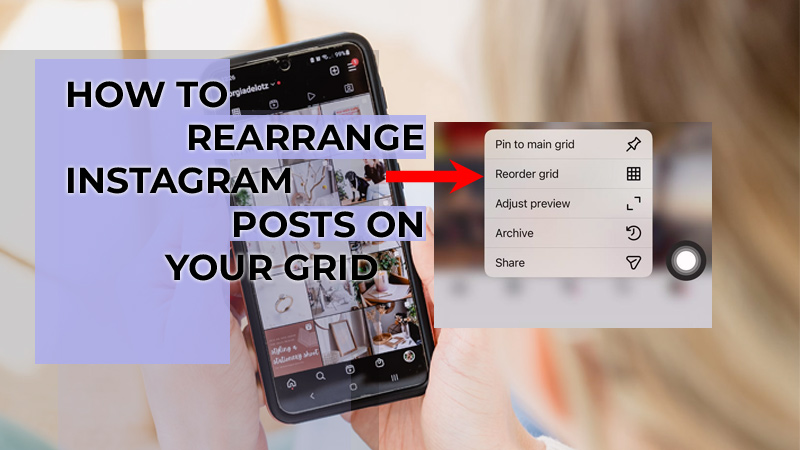
- Press and hold the post until the available options appear.
- Select the Reorder Grid option.
- Move the post to your preferred position.
- Save your changes and check your updated profile.
This simple process allows users to create a more balanced and attractive profile without affecting existing content performance. The feature works especially well for accounts that want to improve their Instagram profile layout or create a more professional appearance.
How to Rearrange Grid on Instagram Business Account?
For business accounts, rearrange Instagram posts on the grid is more than changing post order—it helps create a stronger brand experience and first impression.
Businesses can use this feature to highlight their most important content, such as:
- New product launches and promotional campaigns.
- Customer reviews and success stories.
- Seasonal offers or limited-time announcements.
- Brand introductions and important Instagram updates in 2026.
A well-planned profile helps companies create a stronger visual identity and guide visitors toward the content they want them to see first.
For example, a clothing brand may showcase a new collection at the beginning of its profile, while a service provider may prioritize testimonials or educational content.
Using this feature as part of Instagram customization allows brands to refresh their existing profiles without deleting valuable posts. It also supports stronger social media branding by helping businesses maintain a consistent and professional appearance.
Reorder Instagram Profile Not Showing; What Should You Do?
Although Instagram’s profile grid editing feature is becoming available to more users, some accounts may still not have access to the option to edit Instagram grid yet.
If the option is not visible, try these solutions:
- Update the Instagram app: Make sure you are using the latest version from your device’s app store.
- Restart the application: Closing and reopening Instagram can sometimes refresh available features.
- Check your account type: Some new Instagram creator tools are introduced to specific account categories first.
- Clear app cache: Removing temporary files may help the app load new settings correctly.
- Wait for the rollout: Some features become available gradually, even after an official announcement.
Another reason you may not see the option is that Instagram continues testing and improving its grid editing option before making it available to everyone. Keeping your app updated and checking your profile settings regularly is the best approach.
Benefits of Rearranging Your Instagram Grid
A well-organized profile helps you organize Instagram profile content more effectively, improves your appearance, helps visitors understand your style, and builds trust.
The ability to rearrange Instagram posts on the grid gives creators and brands more control over their online presence.
Some key benefits include:
- Creating a more professional-looking profile.
- Highlighting important content without reposting.
- Improving the visitor experience.
- Supporting better content presentation.
- Making your page easier to navigate.
For creators, this feature can transform a simple account into a more polished creator profile. For businesses, it can help showcase products, services, and campaigns in a way that matches their marketing goals.
A carefully planned grid also improves Instagram post placement, allowing users to decide which content deserves more visibility when someone visits their profile.
Tips for Designing a Better Instagram Grid
Having the ability to change your profile arrangement gives you more creative freedom, but a successful grid still requires planning.
A good-looking profile is not only about moving posts around; it is about creating a visual experience that feels consistent and represents your brand or personality.
Here are some practical tips to create a stronger grid:
- Use Consistent Colors: A consistent color style helps your profile feel more connected. Choose a few main colors, editing styles, or visual elements that appear across your posts to create a recognizable identity.
- Alternate Close-Up and Wide Shots: Mixing different types of images can make your profile more dynamic. Combining detailed photos with wider scenes prevents your page from looking repetitive.
- Keep Text Centered: If you create graphics or text-based content, make sure important information stays visible in the center area. This helps your posts look cleaner across different devices.
- Use Similar Editing Styles: Using the same filters, lighting style, or photography approach can create a more professional feed design. A consistent appearance helps visitors understand your content style immediately.
- Plan Your First Three Rows: The first part of your profile usually creates the strongest impression. Arrange your most valuable content where new visitors are most likely to see it and make sure these posts represent your main message.
- Don’t Overdo Patterns: While creative layouts can look attractive, overly complicated patterns may make your profile difficult to maintain. Focus on balance, readability, and authenticity instead of creating a design that feels forced.
A thoughtful approach to content planning can help you build a more attractive and memorable profile. Whether you are a creator, brand, or business owner, combining organization with creativity allows your page to communicate your story more effectively.
A strong grid is also an important part of Instagram profile customization because it helps transform a collection of posts into a clear visual identity.
Conclusion
Instagram has finally given users more freedom to create a profile that matches their vision. With the ability to rearrange Instagram posts on the grid, creators and businesses can improve their profile appearance, strengthen their branding, and showcase their best content without losing engagement.
Have you ever deleted a post just because it ruined your Instagram grid? What would be the first post you move if you could redesign your profile today? Your Instagram grid tells a story; start creating a profile that makes people stop scrolling. Share your best grid design idea and inspire other creators!