How to Add Multiple Captions on an Instagram Post ?


What if every swipe revealed a new part of your story? Learning how to add multiple captions on an Instagram post lets you turn a simple carousel into a more engaging experience, where each slide has its own voice.
Instead of relying on one caption to explain everything, you can guide your audience step by step. In this guide, you’ll discover how the feature works, who can use it, and the best ways to make your carousel posts stand out.
What Are Multiple Captions on Instagram?
The Instagram multiple captions feature allows creators to attach different text to each slide within a carousel instead of relying on a single description for the whole Post. Previously, every carousel had only one caption displayed beneath the entire collection of photos or videos. This meant users often had to include lengthy explanations or add text directly to images.
With the ability to add captions to Instagram carousels, every slide can have its own description. As people swipe through posts, the caption changes automatically to match the content being viewed. This creates a cleaner experience and gives each image or video its own context. Whether you’re sharing a travel story, a product launch, or an educational guide, viewers receive information exactly when they need it instead of scrolling back and forth through one long caption.
Multiple Captions on an Instagram Post is one of Instagram’s new updates for 2026.
For more information about the latest Instagram updates in 2026, you can read What Are the Latest Instagram Updates in 2026?.
Add Multiple Captions on an Instagram Post
If you want to add multiple captions to an Instagram carousel post, the process is simple. Before you begin, make sure you’re using the latest version of Instagram, as this feature is being released gradually and may not be available for every account yet.
- Update Instagram: Open the App Store (iPhone) or Google Play Store (Android) and check for the latest Instagram updates in 2026. Installing the newest version gives you access to recently released features and improves overall app performance.
- Tap the + Icon: Launch Instagram and tap the + icon to create a new post. Select Post, then continue to the media selection screen.
- Select Multiple Photos or Videos: Choose two or more photos or videos to create your Instagram carousel. Rearrange the slides in the order you want people to view them, since each slide will have its own caption.
- Go to the Caption Section: After editing your photos or videos, tap Next until you reach the screen where you normally write your post caption. This is where you’ll find the new caption options if the feature is available for your account.
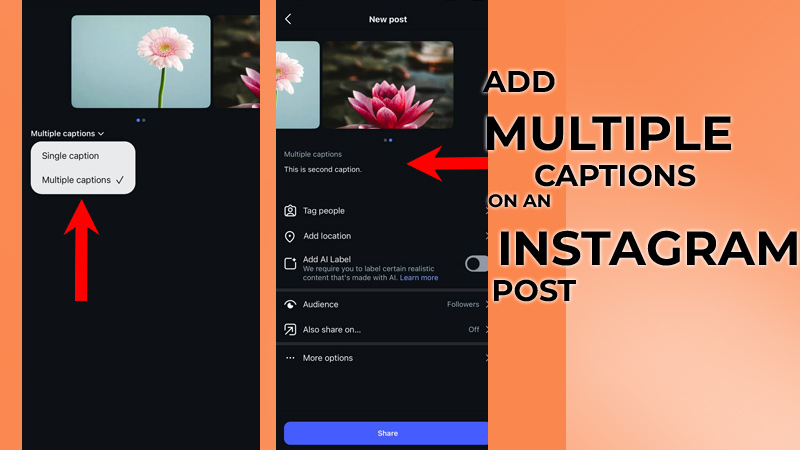
- Turn on Multiple Captions: Look for the option to enable multiple captions. If your account has received the latest Instagram carousel feature, you can activate it and start adding individual captions to Instagram slides instead of using a single caption for the entire carousel.
- Write a Unique Caption for Every Slide: You can now add captions to each carousel slide by selecting each photo or video individually and writing a different caption. These per-slide captions allow you to explain every image separately, making your content easier to follow. They also create more relevant contextual captions, helping viewers understand each slide without reading one long description.
- Publish Your Carousel: Once you’ve finished writing the captions for every slide, review your carousel carefully to ensure each caption matches its image or video. When everything looks right, tap Share to publish your Post. As viewers swipe through the carousel, they’ll see the corresponding caption displayed with each slide, creating a more engaging and organized experience.
Who Can Use Multiple Captions on Instagram?
The ability to add multiple captions on Instagram carousel is being rolled out gradually, which means not every user will have access at the same time.
Like many new Instagram features, availability depends on your account, app version, region, and the progress of Instagram’s global rollout.
If your account is eligible, you can use this feature on the following account types:
- Personal accounts: Great for sharing travel stories, family memories, and everyday moments with a unique caption for each slide.
- Creator accounts: Ideal for influencers, educators, and content creators who want to improve Instagram carousel captions with step-by-step explanations or engaging narratives.
- Business accounts: Perfect for brands that want to showcase products, highlight services, or create a detailed product showcase within a single carousel.
Even if your app is fully updated, you may not immediately see this carousel post feature. The latest Instagram carousel update is being released gradually, so some users may receive access days or even weeks before others.
Why Are Captions on Instagram Not Working?
If you can’t add multiple captions on an Instagram post, don’t worry; this doesn’t necessarily mean there’s a problem with your account. Since this is a newly released feature, Instagram is rolling it out gradually, and several factors may prevent it from appearing.
Here are the most common reasons why the feature isn’t working:
- Your Instagram app is outdated: Install the latest version from the App Store or Google Play to access the newest features.
- The feature hasn’t reached your account yet: Instagram often releases updates in phases, so some users receive new features earlier than others.
- Your device software needs an update: Running the latest version of Android or iOS can improve compatibility with new Instagram features.
- Temporary app bugs or glitches: Cached data or temporary software issues may stop new features from appearing correctly.
- Limited testing: Instagram sometimes tests new features with a small group of users before making them available worldwide.

How to Fix the Problem?
If the feature isn’t available, try these troubleshooting steps:
- Update Instagram to the latest version.
- Restart the app and sign in again.
- Clear the Instagram cache if you’re using Android.
- Reinstall the app to refresh its files.
- Restart your device.
- Check for operating system updates.
- Wait for the feature to be released to your account if it’s still rolling out.
If you’ve completed all of these steps and still don’t see the option, the feature may simply not be available for your account yet. Instagram frequently enables new features over several weeks, so checking for updates regularly is the best approach until access is granted.
Multiple Captions vs Traditional Instagram Captions
After getting information on how to add captions to Instagram carousel, now understanding the difference between a Single Caption and Multiple Captions can help creators choose the best format for their content.
With a traditional caption, creators often need to write long text to explain the entire carousel. However, using multiple captions allows them to add short contextual text that matches each slide.
| Single Caption | Multiple Captions |
| One caption for all slides | One caption per slide |
| Long text | Short contextual text |
| Less organized | More organized |
| Limited storytelling | Better storytelling |
| Harder for tutorial carousel | Perfect for tutorials |
For Instagram creators who want to create an Instagram carousel tutorial, multiple captions make it easier to explain each step clearly without overwhelming the audience with a single long caption.
Benefits of Using Multiple Captions on an Instagram Post
Choosing to add captions to an Instagram carousel can significantly improve how your audience interacts with your carousel content.
By giving each slide its own caption, you can provide clearer explanations, create a more engaging viewing experience, and guide users through your content one step at a time instead of overwhelming them with a single, lengthy description.
Here are the main benefits of using multiple captions:
- Better storytelling: Each slide can continue the story naturally, helping creators build a clear message from the first image to the last.
- More context for every image: With separate captions, users can understand the purpose and meaning behind each photo or video without searching through a long description.
- Easier information consumption: Breaking information into smaller sections makes content easier to read, especially for tutorials, guides, and educational posts.
- Cleaner carousel design: You can reduce the amount of text placed directly on images, creating a more professional and visually appealing Instagram carousel.
- Higher carousel engagement: Relevant captions for each slide encourage users to spend more time viewing and interacting with your content.
- More effective educational content: Creators can build an educational carousel where every slide explains one specific idea, step, or concept.
- Better product explanations: Businesses can use this feature to highlight different features, benefits, and details of their products or services.
- More powerful Instagram post captions: Instead of creating one general description, you can write more accurate captions that match each slide’s purpose.
This feature also supports social media marketing strategies by helping brands and creators deliver clearer messages, improve audience understanding, and create more meaningful content experiences.
Conclusion
Instagram’s multiple captions feature is changing the way creators and brands share carousel content by making every slide more meaningful, organized, and engaging.
Learning how to add multiple captions on Instagram posts helps you create clearer stories, improve audience experience, and make your content stand out.
Let’s talk about it: could this new feature change the way you create carousel posts forever? What type of content would you use multiple captions for first? Imagine turning every slide into a separate story and tell us how you would use it.